Overview

Project Name
DataExtraction.
Description
It is a specialized library included in the Embedded DLLs package. Its main purpose is to streamline and simplify the process of retrieving data from databases by leveraging structured models.
The DataExtraction library provides users with a comprehensive set of methods that facilitate direct and efficient interaction with various types of databases. By using predefined data models, users can perform automated queries and retrieve relevant information without needing to write extensive database-specific code.
This makes DataExtraction particularly useful in automated testing environments, where consistency, repeatability, and accuracy are crucial. It abstracts away much of the complexity typically involved in database interactions, allowing testers and developers to focus on test logic and validation rather than low-level data handling.
Target Audience
Developers and QA Automation Engineers.
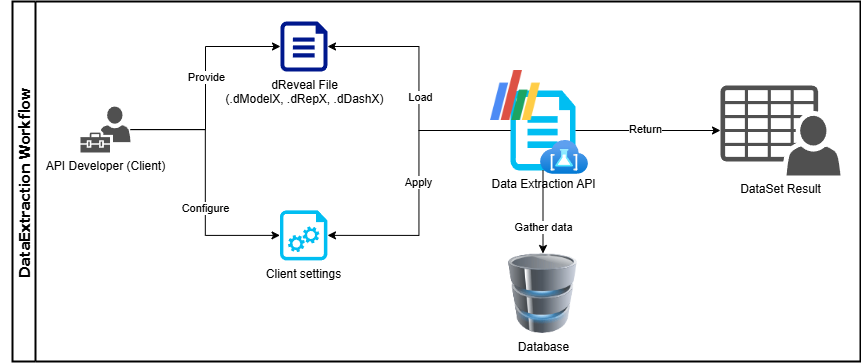
DataExtraction Workflow
The process starts with a dReveal model file, which is interpreted by the DataExtraction API. Based on configured settings, it connects to a data source, executes defined logic, and returns the data in a DataSet format.
Getting Started
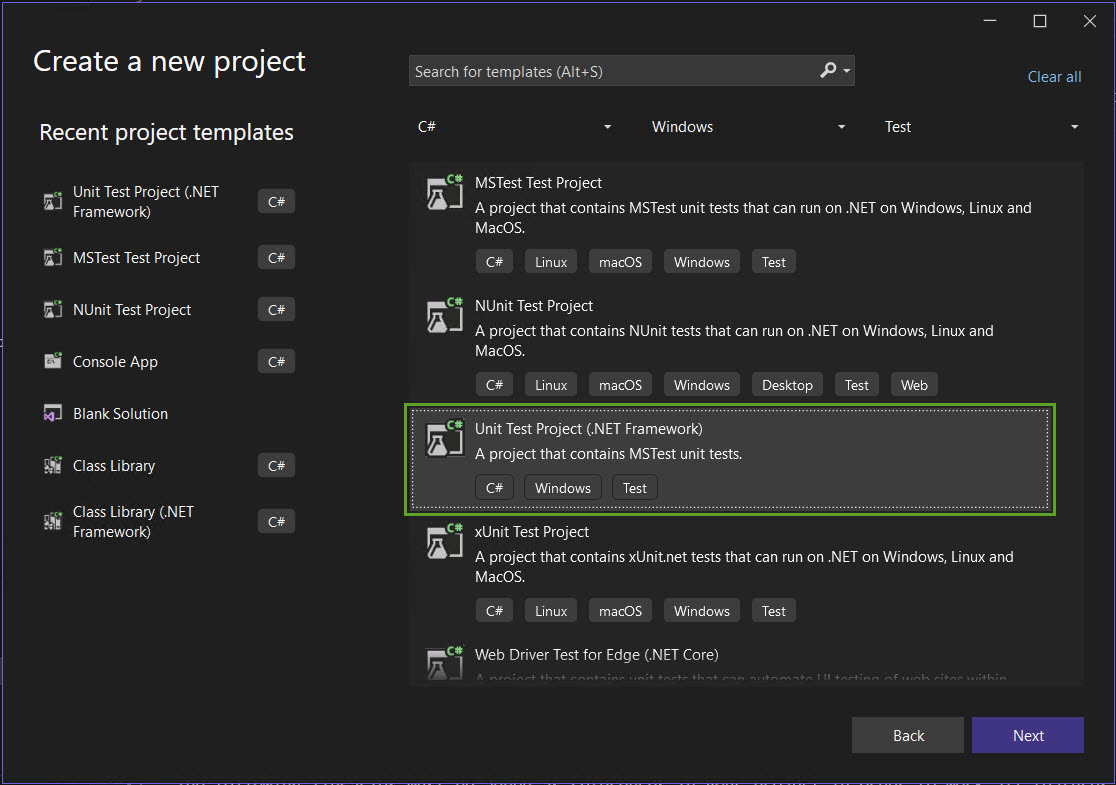
In this case the DataExtraction library is going to be used within a Test project as an example.
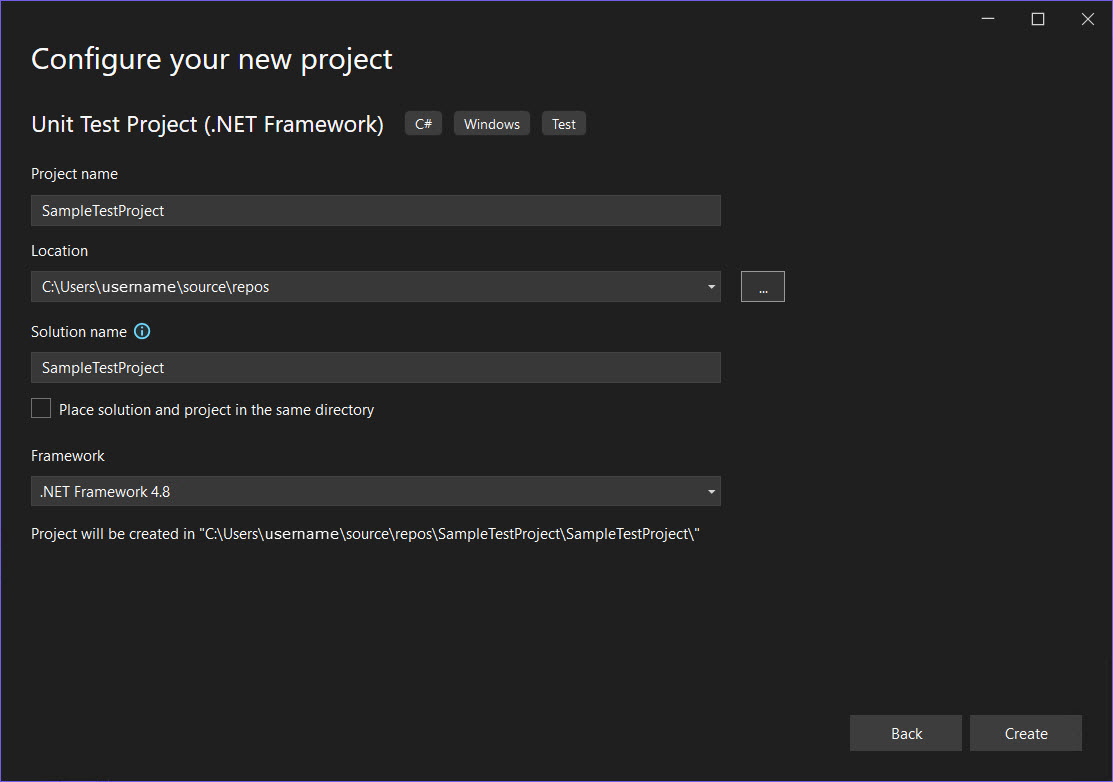
Create a Unit Test project containing MSTest unit tests on the .NET Framework 4.8 platform.
dReveal Embedded Libraries
The following libraries must be added as references in your project in order to be able to use all features provided by DataExtraction.
1. Common
- InfoArch.Common.Common.v4.3.dll
- InfoArch.Common.Core.v4.3.dll
- InfoArch.Common.DataExtraction.v.4.3.dll
- InfoArch.Common.Office.v4.3.dll
2. Providers
- InfoArch.Common.Providers.v4.3.dll
- InfoArch.Common.Providers.v4.3.SQLServer.dll
3. Web
- InfoArch.Web.v4.3.Filter.dll
- InfoArch.Web.v4.3.Grid.dll
- InfoArch.Web.v4.3.Languages.dll
- InfoArch.Web.v4.3.Mvc.dll
- InfoArch.Web.v4.3.SharedUI.dll
4. Third Party
- DevExpress.Charts.v24.1.Core.dll
- DevExpress.Dashboard.v24.1.Core.dll
- DevExpress.Dashboard.v24.1.Web.dll
- DevExpress.Dashboard.v24.1.Web.Mvc5.dll
- DevExpress.Dashboard.v24.1.Web.WebForms.dll
- DevExpress.Data.Desktop.v24.1.dll
- DevExpress.Data.v24.1.dll
- DevExpress.DataAccess.v24.1.dll
- DevExpress.DataVisualization.v24.1.Core.dll
- DevExpress.Docs.v24.1.dll
- DevExpress.Drawing.v24.1.dll
- DevExpress.Office.v24.1.Core.dll
- DevExpress.Pdf.v24.1.Drawing.dll
- DevExpress.PivotGrid.v24.1.Core.dll
- DevExpress.Printing.v24.1.Core.dll
- DevExpress.Spreadsheet.v24.1.Core.dll
- DevExpress.Utils.v24.1.dll
- DevExpress.Web.Mvc5.v24.1.dll
- DevExpress.Web.Resources.v24.1.dll
- DevExpress.Web.v24.1.dll
- DevExpress.Xpo.v24.1.dll
- DevExpress.XtraCharts.v24.1.dll
- DevExpress.XtraReports.v24.1.dll
- DevExpress.XtraTreeMap.v24.1.dll
- ICSharpCode.SharpZipLib.dll
Connection-String
DataExtraction supports the following connection string:
SQL Data Sources
SQL Server
Data Source=MyServer; Initial Catalog=myDatabase; User ID=myUser; Password=myPassword
App.config
Add an App.config file into the project:
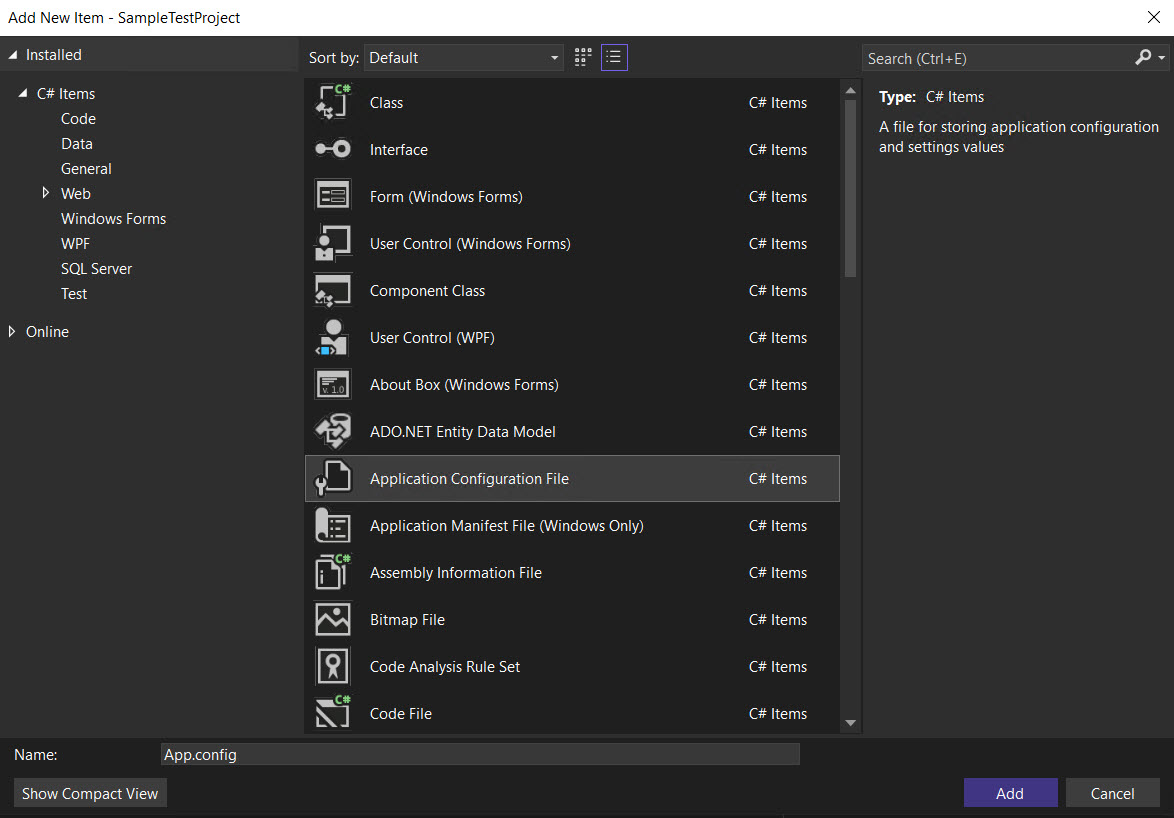
Then add the SharedFolderPath, which is the path where the dReveal files are located and the ConnectionString in an <appSettings> node within the <configuration> node:
<appSettings>
    <add key="SharedFolderPath" value="C:\ReportFiles" />
    <add key="ConnectionString" value="Data Source=MyServer; Initial Catalog=myDatabase; User ID=myUser; Password=myPassword" />
</appSettings>
Note: Replace the values with your report files directory and DataBase information, then save the file.
Third Party
After adding the dReveal libraries as references and the App.config file into the project, the DataExtraction requires the installation of the following NuGet Package library:
- Microsoft.AspNet.Mvc (Latest stable Version)
Note: The AdventureWorksDW2022 Database is going to be used for the DataExtraction examples.
Usage Example
Creating a basic TestMethod within SampleTestProject:
using InfoArch.Common.DataExtraction.Grid;
using Microsoft.VisualStudio.TestTools.UnitTesting;
using System.IO;
using System.Configuration;

namespace SampleTestProject
{
    [TestClass]
    public class UnitTest1
    {

        private MemoryStream GetStream(string path)
        {
            MemoryStream ms = new MemoryStream();

            using (FileStream file = new FileStream(path, FileMode.Open, FileAccess.Read))
            {
                byte[] bytes = new byte[file.Length];
                file.Read(bytes, 0, (int)file.Length);
                ms.Write(bytes, 0, (int)file.Length);
                file.CopyTo(ms);
                file.Close();
            }

            return ms;
        }

        [TestMethod]
        public void GetGridResult()
        {
            string connectionString = ConfigurationManager.AppSettings["ConnectionString"];
            string fileName = "Product Inventory.dRepX"; //Replace this variable with your grid report name.
            string sharedFolderPath = ConfigurationManager.AppSettings["SharedFolderPath"];
            string filePath = $"{sharedFolderPath}\\{fileName}";

            DRevealGridClientSettings dRevealGridClientSettings = new DRevealGridClientSettings()
            {
                ConnectionString = connectionString,
                FileName = fileName,
                File = GetStream(filePath),
                PageLength = 20,
            };

            DRevealGridResult dRevealGridResult = InfoArch.Common.DataExtraction.Helper.DRevealGridHelper.GetDRevealGridResult(dRevealGridClientSettings);
            Assert.IsNotNull(dRevealGridResult, "The DRevealGridResult should not be null.");
        }
    }
}
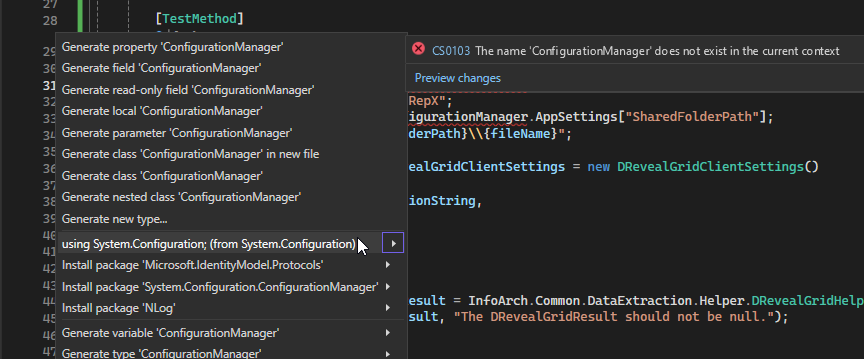
Note: Add the System.Configuration library in the references as following:
- Press "Ctrl+." over "ConfigurationManager".
- Select the "using System.Configuration; (from System.Configuration)" option.
Utility method
The following method is useful in order to obtain the dReveal file as "memory stream" needed for the report client settings.
private MemoryStream GetStream(string filePath)
{
    MemoryStream ms = new MemoryStream();

    using (FileStream file = new FileStream(filePath, FileMode.Open, FileAccess.Read))
    {
        byte[] bytes = new byte[file.Length];
        file.Read(bytes, 0, (int)file.Length);
        ms.Write(bytes, 0, (int)file.Length);
        file.CopyTo(ms);
        file.Close();
    }

    return ms;
}